
How WordPress Cache Really Works: From the Browser to the Database

By Maciej Nowak
See how WordPress caching works from the browser and CDN to Redis, OPcache, and MySQL – and how each layer affects performance and safe content delivery.
“We turned on caching” is one of those sentences that can end a technical discussion before it has actually started. Everyone around the table understands the word, so everyone nods. But the browser may be caching an image, Cloudflare may be passing the HTML straight through, a page-cache plugin may be writing files, Redis may be saving database work and OPcache may only be saving PHP compilation. All of them are cache. None of them does the same job.
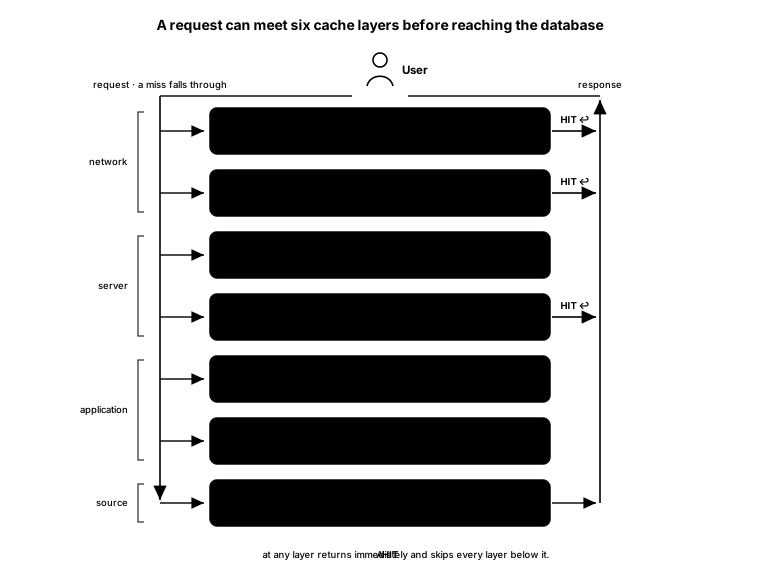
The uncomfortable point is that “cache” is not a feature you switch on. It is a stack of independent decisions between a user and a database. Each layer stores a different thing, in a different place, under a different key, for a different length of time. A hit near the user can avoid the entire stack below it. A miss at the top tells you almost nothing about what happens further down.
This distinction is daily work for us at Osom. When we inherit a WordPress platform, we do not ask whether caching is enabled. We ask which response was stored, where it was stored, which requests can reuse it, what makes it stale and who can remove it. Without those answers, “enabled” is just a comforting label in a control panel.
First, the small HTTP vocabulary that controls the stack
RFC 9111 defines an HTTP cache as “a local store of response messages and the subsystem that controls storage, retrieval, and deletion of messages in it.” The wording matters. An HTTP cache stores response messages for future equivalent requests. It does not somehow make PHP or MySQL intrinsically faster. It avoids asking them to repeat work when the cache can safely reuse an earlier result.
That creates the first important split: private and shared caches. RFC 9111 says a shared cache stores responses for reuse by more than one user, while a private cache is dedicated to one user and is often part of a user agent. In practice, the browser cache is private. A CDN or reverse proxy is shared.
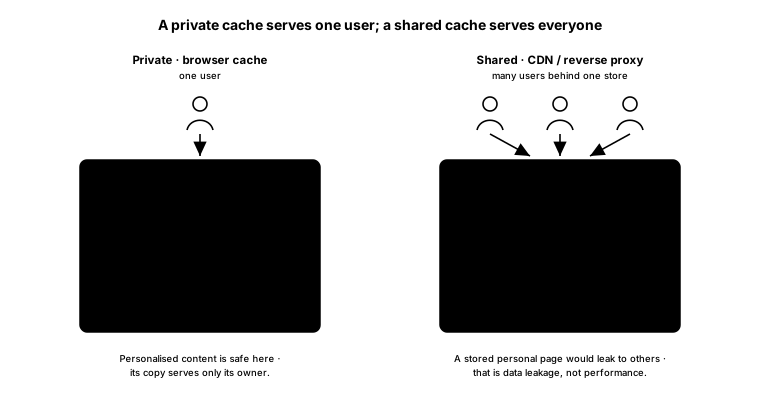
A private cache may hold a personalised response because its copy belongs to one user. A shared cache needs a much harder boundary. If an account page, quotation, basket or distributor price is stored as though it were public, the problem is no longer performance. It is data leakage. MDN is blunt here: forgetting private on personalised content can cause a shared cache to reuse it for multiple users.
Cache-Control is the language the origin uses to express those decisions. Its core directives are easy to misread, because several of their names promise things they do not actually mean.
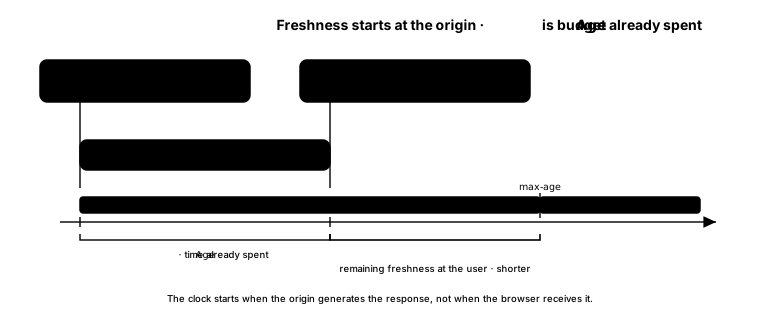
max-age=N says how long a response remains fresh. The clock starts when the origin generates the response, not when a browser receives it. RFC 9111 describes the Age header as the cache’s estimate of the seconds since the origin generated or validated that response. A response arriving with a non-zero Age has already spent part of its freshness budget elsewhere in the chain.
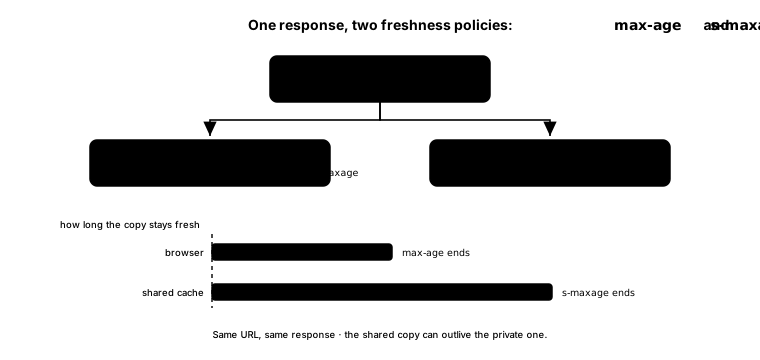
s-maxage=N sets a different freshness limit for shared caches. It overrides max-age or Expires there, while private caches ignore it. This lets one response tell a browser to keep a page briefly and an edge cache to keep it longer. One URL, one response, two policies.
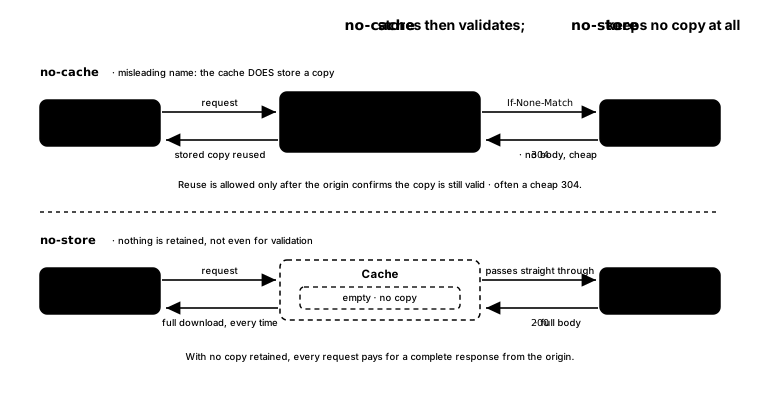
no-cache does not mean “do not cache”. MDN states it exactly: “no-cache allows caches to store a response but requires them to revalidate it before reuse.” no-store is the instruction not to store any part of the request or response. The first can still save bandwidth through validation. The second deliberately gives that benefit up.
private forbids a shared cache from storing the response, although a private cache may store it. public explicitly marks a response as cacheable. That is not harmless decoration: MDN notes that public can allow shared storage even for a request carrying Authorization. If you are adding it to solve a low hit rate, you had better understand what you are authorising.
Expires is the older, date-based freshness mechanism. When max-age is present, RFC 9111 requires recipients to ignore Expires; for a shared cache, s-maxage takes precedence too. It remains useful for compatibility, but it should not be the policy you reason from when Cache-Control is also there.
Freshness itself is simple. While the response age is below its freshness lifetime, the cache can reuse it immediately. Once that lifetime is exceeded, the response is stale. Stale does not necessarily mean useless or deleted. It means the cache must follow another rule before reuse.
Stale responses do not always need to be downloaded again
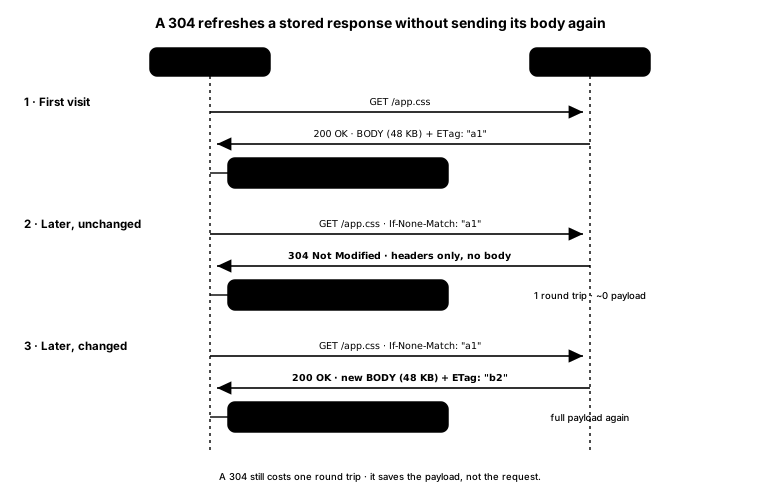
A stale cache entry can be validated. The origin gives a response a validator such as an ETag, an identifier for a specific version, or Last-Modified, a less precise timestamp fallback. On the next request, the client sends that value back in If-None-Match or If-Modified-Since.
If the representation changed, the server returns the new response. If it did not, the server returns 304 Not Modified, the cache marks its stored copy fresh again and reuses the body it already has. There is still a network round trip and the origin still does some work. The saving is that it does not transmit the full representation. A 304 is cheaper than a 200 with the same large body; it is not the same as making no request.
Then comes the cache key: the rule deciding whether two requests are equivalent. Method and URL are the starting point, but Vary adds request headers that affected the representation. Vary: Accept-Encoding can separate Brotli and gzip versions. Vary: Accept-Language can separate language versions.
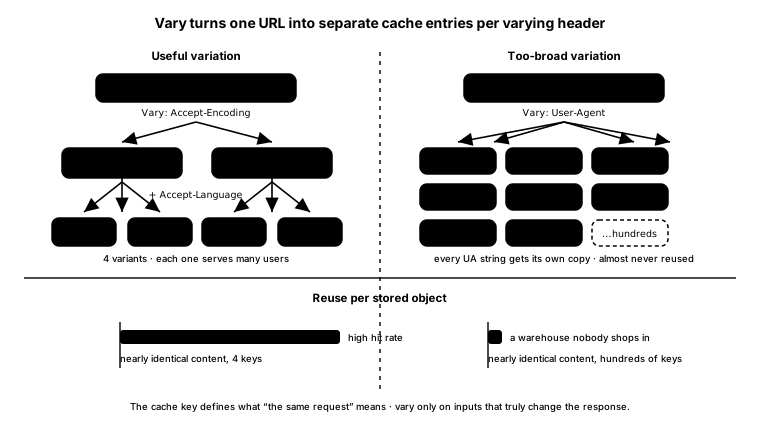
Too little variation can serve the wrong representation. Too much can make almost every request unique and destroy the hit rate. Vary: User-Agent is a classic way to create a warehouse full of objects that nobody reuses. The cache key is not plumbing. It defines what “the same request” means, and therefore whether reuse is correct at all.
The cache stack, from the user inward
Now we can follow one request. Imagine a visitor opening a public WordPress product page.
1. Browser cache: the request that never leaves the device
The browser stores HTTP responses in the user’s memory or on disk. On a fresh hit, it can use a CSS file, script, image or document without contacting the site. Nothing further down the stack gets a vote because there is no network request to answer.
This is why fingerprinted static assets work so well. A filename such as product-grid.xqvz.css can receive a long freshness lifetime because a change produces a new URL. The old object does not need an emergency purge; new HTML simply points at the new one. HTML is different because its URL usually remains stable while its content changes.
2. CDN or edge cache: close to many users, but shared
If the browser cannot answer, the request reaches the edge. A CDN can store reusable HTTP responses near users and keep traffic away from the origin. But “we use Cloudflare” still does not mean “our WordPress pages are cached”. Cloudflare’s documentation says: “The Cloudflare CDN does not cache HTML or JSON by default.” Static assets may hit at the edge while every HTML request continues into PHP.
Caching public HTML therefore requires an explicit rule and explicit exclusions. WordPress admin, login, previews and personalised or commerce paths cannot be swept into the same public policy. On Cloudflare, cf-cache-status makes the distinction visible: HIT found a stored resource, MISS went to origin, DYNAMIC was not considered eligible and BYPASS was told not to cache by the origin. Those states describe different problems. Treating all four as “the CDN is slow” wastes a lot of afternoons.
3. Reverse proxy: a response cache in front of WordPress
Further inward, Varnish or NGINX can cache the response before PHP-FPM runs. NGINX fastcgi_cache, for example, can store the result returned by PHP and serve a later hit without booting WordPress at all. Varnish has programmable rules for cache keys, TTL, grace periods, cookies and bypasses.
This layer generally deals in HTTP response objects: body, status and headers. It is also not a transparent pipe. A proxy can hide, replace or add headers, and it can refuse storage when it sees cookies or cache-control directives that make the response unsafe. Its configuration is part of application behaviour whether the application team owns that configuration or not.
4. Full-page cache: the distinction WordPress teams often miss
A page cache stores rendered HTML so WordPress does not rebuild the page for every anonymous visitor. Page-cache plugins and server-side page caches can produce the same visible outcome, but their stored unit matters.
A file-based cache such as WP Rocket can save the content as HTML files and serve them through web-server rewrite rules. On that hit path, PHP does not execute. Therefore headers that PHP would have set dynamically are not recreated automatically; the web server returns the file with headers supplied by its own configuration. They can be reproduced at that layer, but they are not inside the HTML file.
A whole-response cache stores the body together with response metadata. Batcache, for example, records PHP’s header list alongside the rendered page in Memcached and replays those headers on a hit. This is not a minor implementation detail. It decides whether an application-set security, caching or content header is part of the cached artefact or needs to be rebuilt elsewhere.
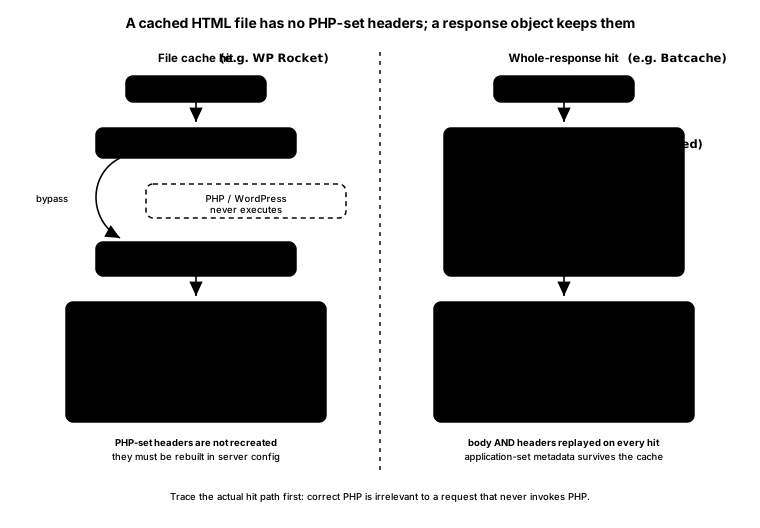
At Osom, this is why we trace the actual hit path before changing a header in WordPress. Correct PHP can be completely irrelevant to a request that never invokes PHP.
5. Object cache: saving database work, not pages
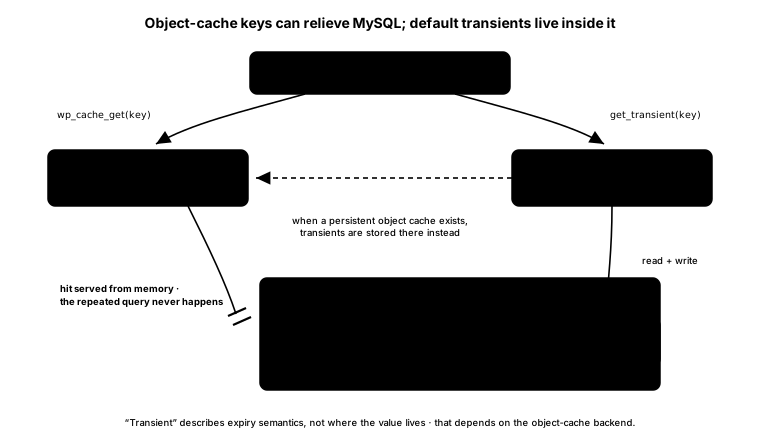
If no page layer answers, WordPress runs. Its object cache stores values under keys, commonly the results of expensive queries or computations. WordPress documentation says the default object cache is non-persistent: it lives only for the duration of one request. That can prevent duplicate work within the request, but the next page load starts again.
A persistent backend such as Redis or Memcached keeps those objects available across page loads. It is especially useful on paths that should bypass public page caching: logged-in views, baskets, checkout and genuinely personalised screens. PHP still runs and WordPress still assembles a response, but repeated database work can be avoided.
We run into this one a lot. A manufacturer’s B2B platform, tens of thousands of parts, and the person who feels it most is the operator logged in all day, working through products. Every screen they open asks the database the same heavy questions again, and the admin crawls. The reflex is to reach for caching, but the obvious kind is off the table here: you cannot store the whole page and hand it around, because that page is theirs, behind a login. This is where Redis earns its place, and where it fits WordPress well. It does not store the operator’s page. It stores the expensive work underneath it, the query results WordPress would otherwise rebuild on every request, and keeps them in memory between page loads. The view is still assembled fresh each time. The database just stops being asked the same thing over and over. On a catalogue that size, that is the difference between an admin that fights the operator and one that keeps up with them.
WordPress transients are often confused with this layer. Without a persistent external object cache, transients are stored in the WordPress database, normally in wp_options. In other words, a “cache” can live in the same database you are trying to relieve. When a persistent object cache is present, WordPress can keep transients there instead. Calling something a transient tells you about its expiry semantics, not that Redis is involved.
6. OPcache: avoiding PHP recompilation
OPcache stores precompiled PHP bytecode in shared memory. The PHP manual says this removes the need for PHP “to load and parse scripts on each request.” It does not store a product page, a query result or an HTTP response. PHP still executes; WordPress can still query MySQL and render HTML.
An OPcache hit and a full-page-cache miss can happen on the same request because they answer different questions. OPcache asks, “Must this PHP file be parsed and compiled again?” Page cache asks, “Must this page be generated again?”
7. The database: the source the other layers are protecting
MySQL is the source of content, options, users, orders and other application data. It has its own internal optimisation mechanisms, but in this stack it is the work we are trying not to repeat unnecessarily. On a complete miss, PHP executes compiled code, WordPress performs the queries it needs, renders a response and gives each higher layer an opportunity to store the appropriate result.
The layers side by side
| Layer | Stored unit | Where it lives | What a hit avoids |
|---|---|---|---|
| Browser cache | Private HTTP response | User’s RAM or disk | Network, edge, origin and application |
| CDN / edge | Shared HTTP response by cache key | Edge nodes | Origin traffic |
| Reverse proxy / FastCGI cache | HTTP response object | Proxy or web server | PHP and database work |
| File-based full-page cache | Rendered HTML file | Application server disk | WordPress rendering; PHP-set headers need separate handling |
| Whole-response page cache | HTML plus response headers | Shared memory store | WordPress rendering while preserving stored metadata |
| Persistent object cache | Query or computation result under a key | Redis or Memcached | Repeated internal work, especially database queries |
| OPcache | Compiled PHP bytecode | PHP shared memory | Parsing and compilation, but not execution |
| MySQL | Source data, not a cache layer here | Database server | Nothing below it |
The highest safe hit is usually the cheapest because it skips every lower layer. “Safe” is doing important work in that sentence. A fast shared-cache hit containing the wrong user’s data is not an optimisation.
Invalidation is where the architecture becomes visible
Every cache trades control for reuse. MDN puts the limitation plainly: “There is no way to delete responses on an intermediate server that have been stored with a long max-age.” If the browser has a fresh copy, the origin may not hear from it until freshness ends. That is why versioned asset URLs are more reliable than trying to recall an immutable file from every device.
Managed caches add an out-of-band control: purge. In WordPress, a sensible purge-on-publish flow removes not only the edited post URL but also affected archives, taxonomies and other pages that include it. Purging everything is easier, but it turns the next wave of traffic into misses across the whole site.
Validation offers another option: keep the object, ask whether it changed and use a 304 when it did not. stale-while-revalidate softens expiry further. RFC 5861 allows a cache to serve a stale response for a defined window while attempting revalidation in the background. stale-if-error can permit a stale response when the upstream fails. For many public marketing pages, slightly old is more useful than a 502.
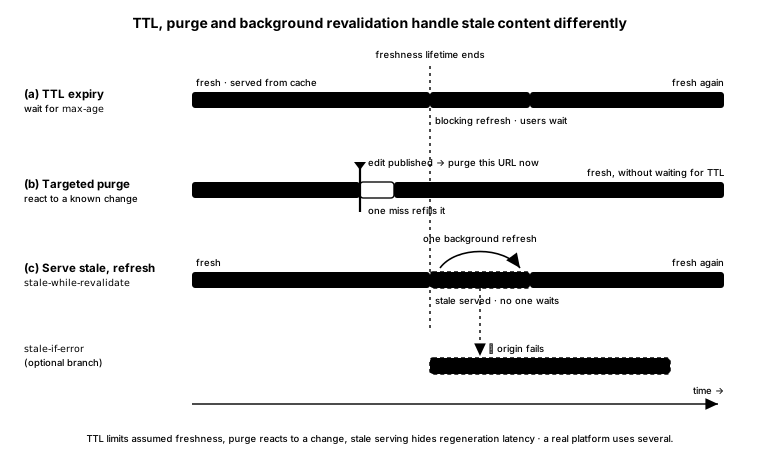
These mechanisms solve different problems. TTL limits how long freshness is assumed. Purge reacts to a known change. Validation asks the origin. Stale serving hides regeneration latency or an origin failure. A maintainable WordPress platform normally uses several, because no single mechanism covers assets, public HTML and personalised paths equally well.
The traps that make a “cached” WordPress site slow or wrong
The first is unsafe variation. Cookies, Authorization, language, device rules and query strings can all affect equivalence. Ignore a meaningful input and users may receive the wrong object. Put every possible input into the key and almost nothing will hit. The job is to identify the smallest key that still represents the response truthfully.
The second is accidental bypass. Plugins can set cookies on public responses. Session code can mark everything private. A CDN rule can exclude HTML while a dashboard still announces that caching is active. This is why we read response headers layer by layer instead of trusting product labels.
The third is partial invalidation. The WordPress page cache may purge when an editor publishes, while the reverse proxy or CDN keeps an older copy. Adding more cache layers without connecting their purge paths can make the system faster and less predictable at the same time.
The fourth is the cache stampede. When a popular object expires, many identical requests can see the miss together and hit WordPress simultaneously. MDN calls the remedy “request collapse”: the shared cache forwards one request to origin and reuses its result for the waiting clients. Cloudflare calls its version a cache lock; NGINX exposes proxy_cache_lock. Without collapsing, the moment the cache is most needed is the moment it steps aside.
Finally, do not optimise only the happy anonymous hit. Editors, customers and logged-in distributors often bypass full-page cache by design. Their path still needs lean queries, a persistent object cache where appropriate, healthy PHP workers and OPcache. Page caching can hide a slow application from visitors. It cannot make that application well engineered.
So the next time someone says “we enabled caching”, leave the switch alone for a moment. Ask which layer, which object, which key, which users, which TTL and which purge path. The quality of the answer will tell you more about the platform than the green badge in its performance plugin.