
WordPress Website Optimization for 2026: What Site Owners Need to Know

By Marta Kuniej
Your website isn’t just a brochure – it’s a performance product. In 2026, the brands that win treat speed, accessibility, and stability as ongoing operations, not a one‑off clean‑up. For site owners, that means adapting to increasingly demanding technical standards, and aligning with evolving user behavior.
At Osom Studio, we focus on helping clients not only meet but exceed performance expectations through strategic development and continuous optimization. Here’s a real-world example that shows why continuous optimization truly matters: The chart below comes from a former client and perfectly illustrates what happens when performance optimization is deprioritized.
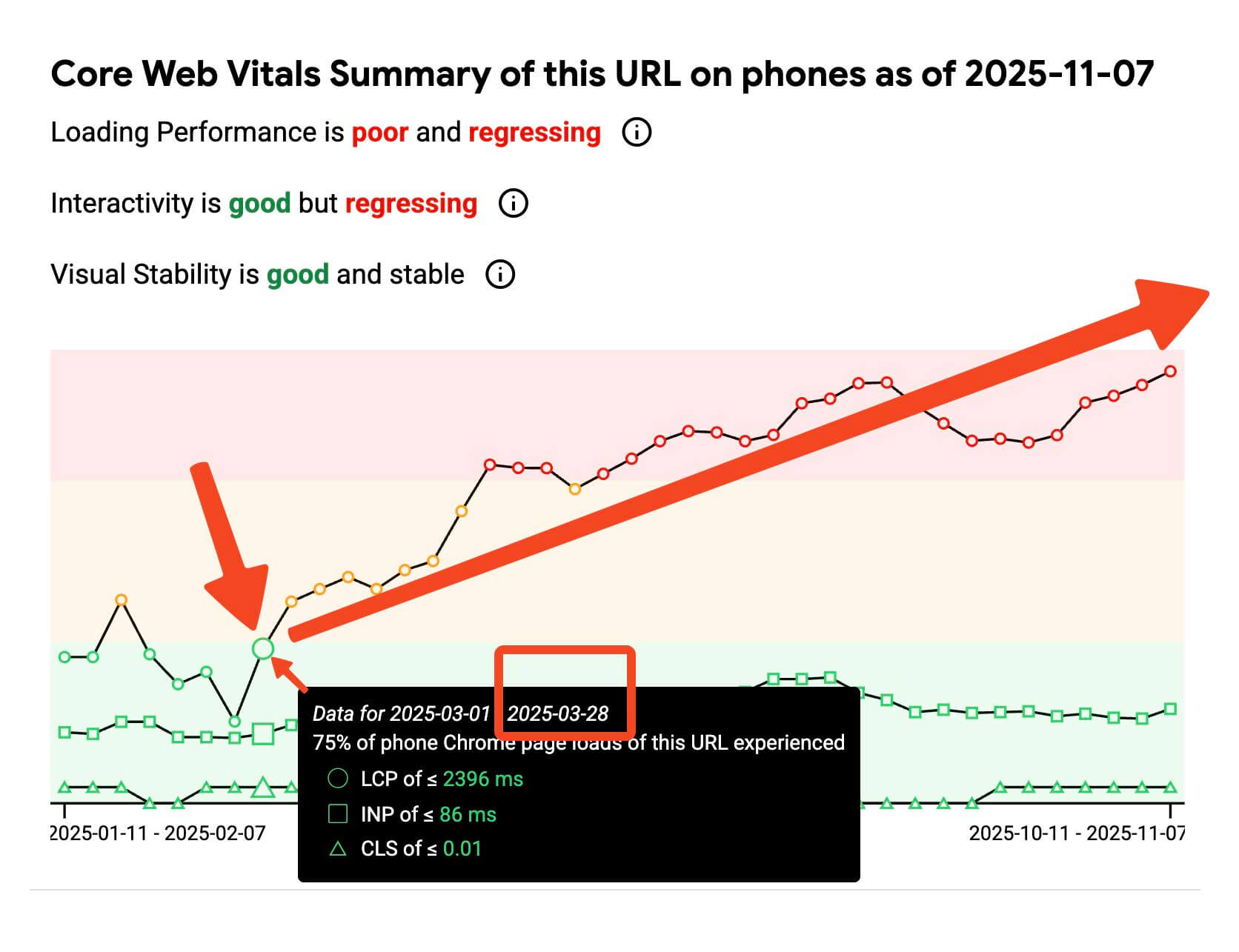
After the collaboration ended and a cheaper agency took over, key Core Web Vitals began to regress within weeks – a clear sign of how quickly technical debt and poor maintenance can undo months of careful work. It’s a reminder that website performance isn’t a one-time achievement but a long-term discipline that requires consistent attention and expertise.This article outlines the critical technical aspects that will define a high-performing WordPress site in 2026 and beyond.
Core Web Vitals Still Define Page Experience
Core Web Vitals remain the baseline for user-centric performance. The key metrics – Largest Contentful Paint (LCP), Cumulative Layout Shift (CLS), and Interaction to Next Paint (INP) – require close attention.
Improving these metrics demands practical action:
- LCP (Largest Contentful Paint) should be under 2.5 seconds. This metric shows how long it takes for the largest visible element on your page – typically a large image or headline text – to appear. A low LCP means users see meaningful content quickly. To improve it, focus on fast image delivery, reduce server response times, and preload important assets.
- CLS (Cumulative Layout Shift) must stay below 0.1. This score measures how much visible elements move unexpectedly as your site loads. Shifting content creates a frustrating experience. To prevent this, always define dimensions for images, videos, and ads, and avoid inserting content above existing elements without warning.
- INP (Interaction to Next Paint) is the new standard for measuring interactivity. It looks at how quickly your site responds to user actions, like tapping a button or opening a menu. A slow INP makes your site feel unresponsive. You can improve it by reducing JavaScript bloat, deferring scripts that aren’t needed immediately, and optimizing how your site handles clicks and inputs.
In September 2025, 53% of websites met all three thresholds. If your site isn’t in that half, you’re already lagging behind.
Business impact: Faster perceived load reduces early abandonment, improves task completion (forms, search, checkout), and increases conversion rates – without adding more traffic or ad spend.
Measuring Performance with PSI
PSI (PageSpeed Insights) is a free Google tool that blends lab data (Lighthouse) with field data (CrUX) to show what slows your pages and how it impacts Core Web Vitals.
- Lab (Lighthouse): a controlled test that’s great for diagnosing issues and validating fixes before deployment.
- Field (CrUX): real‑user data over the last 28 days; this is what ultimately determines whether you pass CWV.
- How to work with it: Fix issues flagged in lab, deploy, then verify improvement in field; repeat monthly and after major changes.
Fast pages lead to better engagement and SEO – slower sites lose visitors and revenue. For example, studies show a 1-second delay can cost ~6% revenue and ~11% pageviews (nitropack.io), and bounce rates jump by 32% when load time goes from 1s to 3s (wpbeginner.com).
Business impact: Treating PSI as part of your maintenance routine helps you track improvements and spot regressions before users do. Consistent monitoring ensures you stay within Core Web Vitals thresholds, maintain visibility in Google Search, and prevent revenue losses caused by slow or unstable user experiences.
Your Site’s Backbone: Hosting and Server Setup
Fast websites start with strong infrastructure. Even if your theme and plugins are well-built, outdated or misconfigured server environments can drag performance down significantly.
To ensure your WordPress site runs efficiently in 2026, your tech stack should include:
- PHP 8.2 or later – Running on the latest stable version of PHP ensures that your site processes code faster and uses server resources more efficiently. This directly affects page load times and server stability.
- HTTP/2 or HTTP/3 support – These modern protocols allow browsers to load multiple resources simultaneously, reducing wait times. HTTP/3, in particular, improves performance on mobile and unstable connections.
- Object caching (e.g. Redis or Memcached) – These tools store frequently accessed data in memory, so WordPress doesn’t have to repeatedly query the database. That means faster page generation and reduced load on your server.
- Server-level compression (Brotli or Gzip) – Compressing assets before sending them to the user dramatically reduces file size and transfer time.
Equally important is your hosting provider. Hosting isn’t just where your website lives – it directly affects how fast it loads, how stable it is under traffic, and how well it performs in tools like Google PageSpeed Insights. A slow or overloaded server can undermine even the best-optimized theme. That’s why we always recommend modern, performance-optimized managed hosting environments with CDN support, auto-scaling resources, and built-in caching layers.
Business impact: A modern, stable hosting environment ensures your site performs consistently even during traffic surges. Faster server responses and updated protocols not only improve user satisfaction but also keep your site within Core Web Vitals benchmarks, reduce downtime risk, and lower the long-term cost of maintenance and support.
Smarter Caching Is the Performance Safety Net
Caching is one of the simplest and most powerful tools for improving WordPress performance. When configured correctly, it can drastically reduce server load, shorten response times, and keep your site fast even during traffic spikes.
There are multiple layers of caching worth addressing:
- Browser caching ensures that static files like logos or fonts are stored locally in the user’s browser, reducing repeated downloads.
- Page caching generates pre-built HTML versions of your content so that the server doesn’t need to rebuild pages for every visit.
- Object caching stores repeated database queries, improving the backend processing time.
- CDN caching distributes your site across global edge servers, delivering assets closer to the user.
To make this work:
- Use a caching plugin like WP Rocket, which bundles many of these optimizations out of the box.
- Define explicit cache rules using headers like Cache-Control, s-maxage, and stale-while-revalidate.
- Minimize reliance on uncached dynamic content.
- Remove or refactor features that force bypassing cache (e.g., unnecessary per-user personalization on public pages).
- Verify that your CDN is actually caching (check cache status headers) and that HTML caching is enabled where safe.
- Set long lifetimes for static assets (images, CSS, JS) and version them when changed.
Business impact: Caching lets the browser, CDN, and server reuse content that hasn’t changed, so pages load faster on return visits and stay responsive during sales, ads, or PR spikes. By serving more requests from cache instead of your origin, you cut server work and bandwidth, reduce the risk of slowdowns or outages in campaigns, and lower ongoing infrastructure costs.
Media Optimization: The Largest Bottleneck for Speed
Images and videos are the heaviest elements on most WordPress pages. Without optimization, they’re the #1 reason LCP scores suffer – and why your PSI score drops.
To get it right in 2026:
- Compress everything before upload. Even high-quality images can be significantly reduced in file size with no visible quality loss. Use tools like TinyPNG or native WordPress compression.
- Use next-gen formats like WebP or AVIF instead of JPEG or PNG. These newer formats provide the same quality at a fraction of the size.
- Lazy load non-critical media – especially items below the fold – to prioritize what users see first.
- Use proper srcset and sizes attributes to serve different image resolutions based on device and screen size.
- Define width and height for images and embeds to prevent layout shifts.
- Preload the hero image or key font when it’s part of the LCP element.
- Move heavy videos off the page (host externally or use lightweight previews) and defer autoplay.
Additionally, consider progressive rendering techniques that allow key visual elements to load visibly in low resolution before finalizing in full detail. This improves the perceived performance and gives users something to look at immediately. You can read more about LPC on our blog.
Business impact: Optimizing media improves both the first impression and overall engagement. Pages that load quickly and display stable visuals encourage visitors to stay longer, interact more, and trust the brand’s professionalism. Consistent visual performance also supports accessibility goals and keeps your site aligned with design and usability standards, ultimately translating into stronger conversion outcomes.
Accessibility Is Performance’s Quiet Partner
A fast site that’s hard to use is still a poor experience. Accessibility goes hand-in-hand with performance because it ensures that users can interact with your content efficiently, regardless of ability or device.
Key principles to follow:
- Keyboard-friendly navigation ensures that users can explore your site without a mouse.
- Semantic HTML structure helps screen readers interpret your content properly.
- Alt text and ARIA roles improve clarity for users relying on assistive tech.
- Consistent color contrast and focus states make your site more readable and navigable for everyone.
- Avoid sudden layout shifts and motion that hinder comprehension or trigger discomfort.
Accessibility isn’t a one‑time checkbox; it evolves whenever your content, design, or code changes. Build it into everyday workflows: train editors to write meaningful alt text, set team standards for contrast and focus states, and review new components for keyboard and screen‑reader behavior before shipping. Treat it like security or performance – continuous checks, not a one‑off project. And if you interested in a topic of accessibility you definitely need to check out our conversation with Bet Hannon, and Amanda Mace.
Business impact: Staying aligned with current accessibility standards and regulations keeps risk low (fewer complaints or audits) and strengthens trust with enterprise and public‑sector buyers.
Optimization Is a Continuous Process, Not a One-Time Task
Many businesses treat performance like a one-off project. But metrics like LCP, INP, and CLS fluctuate over time depending on updates, third-party scripts, or even seasonal traffic.
To stay on track:
- Run monthly audits using Google PageSpeed Insights and Lighthouse.
- Compare field data (CrUX) with lab data to understand how real users experience your site.
- Use RUM tools (Real User Monitoring) to capture live interaction data and flag regressions.
- Schedule quarterly reviews to update plugins, evaluate infrastructure, and deprecate unused scripts.
Final Thoughts
If your WordPress site is going to perform in 2026, you’ll need to invest in infrastructure, prioritize real-user metrics, and treat optimization as an ongoing process. At Osom Studio, we build this philosophy into every project – because better websites don’t happen by accident.
Given the complexity of modern web optimization, many organizations choose an ongoing maintenance plan that continually safeguards performance, security, and accessibility. This proactive model provides peace of mind and operational comfort – issues are identified early, fixed quickly, and prevented from escalating into user-facing problems or revenue risks.
If you’re ready to upgrade your site’s performance standards, get in touch with our team – we also offer comprehensive website audits that analyze real-world performance metrics and provide clear, actionable insights to help you prepare your platform for meaningful improvements.



Do you need help with your WordPress website?
