You don’t need a page builder to let marketing publish

By Maciej Nowak
When a marketing team asks for Elementor, it often wants one thing from it: to stop waiting for a developer.
When a marketing team asks for Elementor, it often wants one thing from it: to stop waiting for a developer.
One organization whose WordPress site we took over had chosen Elementor for that reason. On their previous site, changing a line of text or an image in an article meant waiting five or six hours for someone else to do it, and replacing a banner could take most of a day. The agency that built their next site proposed a page builder so people inside the organization could make those changes themselves, and the team could publish without asking.
We hear the same request on sales calls. A prospect deciding whether to stay on WordPress told us that if they did, they would definitely want Elementor. For many marketing teams, a page builder and the freedom to publish look like the same thing.
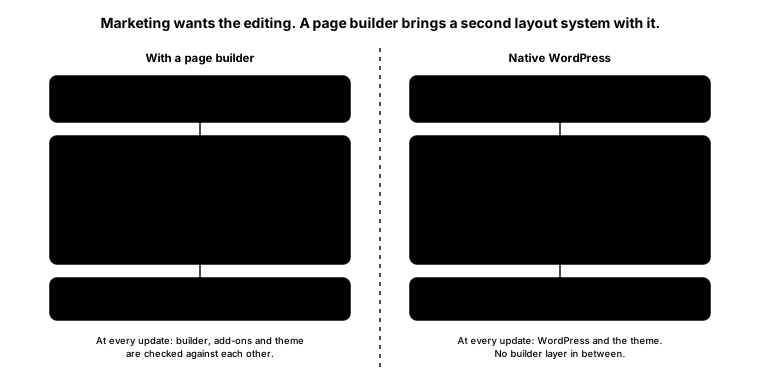
They are two different things sold as one package. The freedom is what marketing wants. The builder is a second layout system installed on top of WordPress, with its own code, widgets, add-ons and update cycle.
What the second system costs
A page builder has to be loaded by every visitor and maintained by someone. Elementor adds scripts and styles for browsers to download, and its compatibility with the theme and add-ons has to be checked whenever any of them changes. Elementor’s own update guidance recommends testing on staging first and names plugin and theme conflicts as possible problems.
The organization whose site we took over had already seen this. They described updates that sometimes broke parts of the site; each time, the change had to be rolled back and tested again to find the plugin responsible. When we reviewed the setup, we also raised concerns about how the builder and the multilingual plugin would perform together. The marketing team could edit its pages, but keeping the site healthy depended on specialists.
The rebuild that brings the queue back
The obvious response is to remove the builder. That fixes the technical problem and, done carelessly, restores the original one. A rebuild on clean code that sends every banner change back to a developer has brought back the five-hour wait with a faster site underneath. Nobody in marketing will notice the cleaner code. They will notice that they can no longer publish a sentence.
Removing a page builder is the easy part of the project. Keeping what it gave the marketing team is the part that takes design work.
A component library instead of a builder
WordPress has its own answer, built into the core software: the block editor. Every page is made of blocks, and that is how we build the sites we deliver.
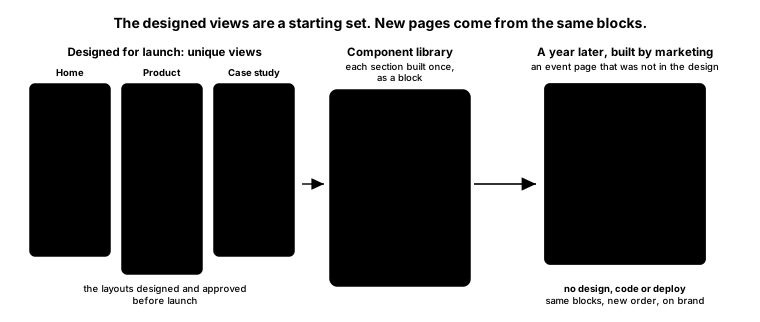
A project starts with a set of unique views, the page layouts we design for launch, such as the home page, a product page, a case study and the contact page. Each view is assembled from sections: a hero with a call to action, a feature grid, a product comparison, a customer quote, a contact panel. We build each section once, as a block, and together those blocks become the client’s component library.
The designed views are a starting set. A year after launch, the marketing team may need an event page, a partner program page or a landing page for a new product line, none of which existed in the original design. They can build it themselves by combining blocks from the library in a new order, with their own copy and images. No design or development work is needed, nothing has to be deployed, and nobody has to wait for us.
On brand by default
A page built this way already looks like the rest of the site. The theme defines the brand’s colors, typography and spacing, and we configure the editor so that each block offers only those. An editor choosing a button color picks from the brand palette; there is no color wheel. With content-only editing and block locking, the internal layout of each section stays as designed while editors change its text, images and links.
This makes the library safe to hand over. Editors can arrange sections freely and fill them with new content, but they cannot accidentally change the parts that carry the brand.
Why it is calmer to run
There is also less to maintain. The block editor is part of WordPress and is developed with it. The blocks are stored in the theme’s code, so a change to them is a code change, versioned and reviewed in the same way as the rest of the theme. When WordPress is updated, there is no separate builder and set of add-ons to check against each other and against the theme. A page that marketing creates adds content, not code, which is why publishing it does not need a developer’s approval.
Where self-service ends
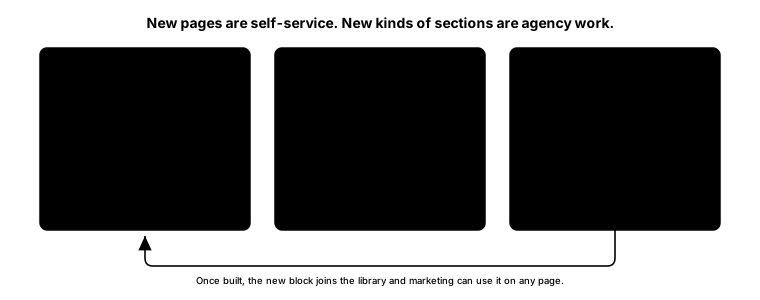
Self-service stops at new kinds of sections. If the team needs something the library does not have, such as an interactive product configurator or a new way of presenting technical data, that is design and development work. Once built, the new block joins the library and is available for every page built after that.
Locking a layout protects the design, but it does not protect data. If marketing must not edit product specifications or prices, that requires user permissions, configured and tested separately. Editors also need to know which sections are synced across pages, such as a shared contact panel, so a change meant for one page does not appear on twenty. A new editor does not remove approvals either: a new technical claim still needs review, and a translation still needs a translator.
The library takes time to design and build, and it pays off where formats repeat. Editors also need a short introduction to what each block is for.
Putting it in the brief
If you are planning a rebuild, write both requirements into the brief: a site that is easy to maintain, and a team that can publish on its own. The technical one is usually there already, as performance targets, integrations, security and languages. The publishing one is easier to forget. List the pages your team publishes regularly, and ask the agency how your team would build a page that is not in the design.
To decide how much independence is worth building, look at recent publishing requests and record three things separately:
| Measure | What to record | Why it matters |
|---|---|---|
| Active work | Time spent preparing, making, checking and coordinating the change | Shows the recurring labor involved |
| Elapsed time | Time from a complete request to correct publication | Shows how long the business waits, including time in queues |
| Documented consequence | What the delay affected, such as paid promotion pointing to an incomplete page | Shows why that particular delay matters |
The five or six hours in our client’s story belong in the second row. They describe a wait, which says nothing on its own about hours of labor or lost revenue. A delayed correction to an old page and a delayed inquiry form for a live campaign have very different consequences.
Testing it before you accept the site
Ask your marketing team to publish a real campaign page on the staging site using their own accounts, not the developer’s administrator login. Then ask them to build one page that was not in the design, using only the library. Have a local editor add a translation, ask IT to confirm that protected data stays protected, and check the finished pages on mobile and against the agreed performance targets. A demonstration from the developer’s account leaves most of this untested.
If a routine page still needs a developer, treat it as a defect and get it fixed before handover. It may be a missing section, a confusing control or a permission that stops an editor from finishing. Each is something the agency can fix while the project is still open, and much harder to fix once the team has gone back to filing tickets.